Bad naming in ADCS doesn't break things immediately. It breaks things two years later, at 2am, when someone is staring at a CRL Distribution Point URL that points to a server that no longer exists, with a hostname that made sense in 2021.
This guide covers the five naming decisions that outlive every ADCS deployment: CA hierarchy names, certificate template names, subject field conventions, CRL/AIA URLs, and Active Directory object names. Get these right once and your PKI survives audits, org restructures, and the inevitable "we need to migrate everything" project.
Watch: ADCS Naming Conventions
CA Hierarchy Names
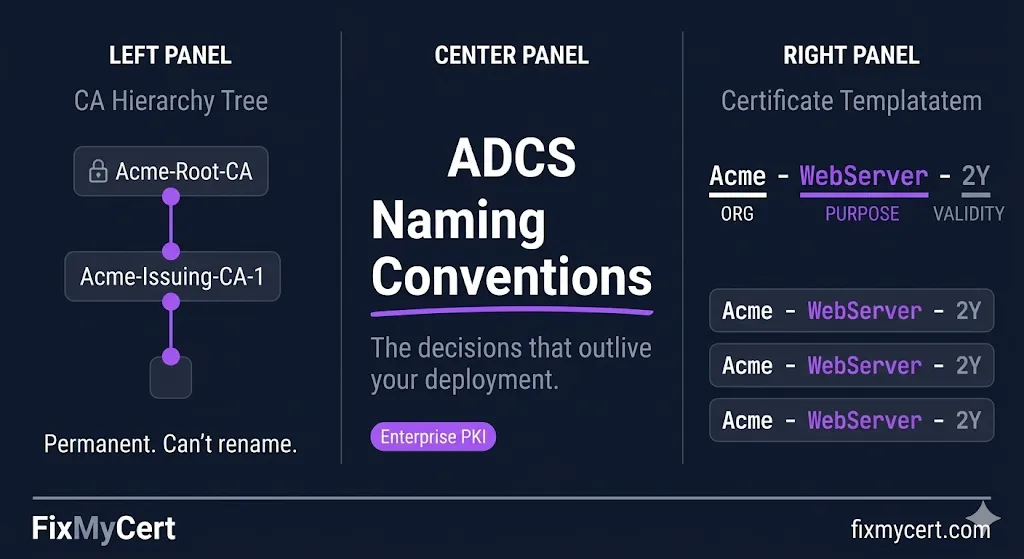
Your CA display name — the CN in its own certificate — is permanent. It gets embedded into every certificate it issues, into CRL files, into AIA extensions. You cannot rename a CA without replacing it entirely.
The pattern that works:
| Tier | Pattern | Example |
|---|---|---|
| Root CA | [ORG]-Root-CA | Acme-Root-CA |
| Policy CA (if used) | [ORG]-Policy-CA | Acme-Policy-CA |
| Issuing CA | [ORG]-Issuing-CA-[N] | Acme-Issuing-CA-1 |
Why the sequence number on Issuing CAs: You will eventually add a second issuing CA. Naming the first one Acme-Issuing-CA (no number) means you'll either rename it later (you can't) or end up with Acme-Issuing-CA and Acme-Issuing-CA-2 forever. Start with -1.
What to avoid:
- ✕Server hostnames in CA names —
CORPCA01-Root-CAties your CA identity to a machine. When the server is decommissioned, the name lives on in every issued cert. - ✕Environment labels in Root CA names —
Acme-Dev-Root-CAsignals a throwaway PKI. Root CAs don't belong to environments; they're organizational trust anchors. - ✕Abbreviations that won't survive headcount changes —
ACME-CORP-CAis fine.ACMECORPNA-WESTDIV-PKI-CAis the naming equivalent of an org chart that was redrawn six months after deployment.
Certificate Template Names
Template names appear in certificate requests, audit logs, enrollment policy responses, and the AD schema. A template named WebServer tells you nothing at 2am. A template named Acme-WebServer-2Y tells you the issuer, purpose, and validity in one glance.
The pattern that works:
[ORG]-[Purpose]-[Validity]
| Template | Name |
|---|---|
| Web server TLS | Acme-WebServer-2Y |
| Client authentication | Acme-ClientAuth-1Y |
| Code signing | Acme-CodeSign-3Y |
| S/MIME user | Acme-UserSMIME-1Y |
| Domain controller auth | Acme-DomainController-2Y |
Validity shorthand: 1Y = 1 year, 2Y = 2 years, 90D = 90 days. Use days for short-lived cert templates.
The Display Name vs. Template Name distinction
ADCS has two names — the template name (used in AD, enrollment requests, scripts) and the display name (shown in the UI). Keep them identical. Diverging them creates confusion when scripting enrollment or reading audit logs.
What to avoid:
- ✕Copying default Microsoft template names — Templates like
WebServer,User,Computerare fine as starting points but should be duplicated and renamed before use. Publishing modifications to default templates creates upgrade and audit problems. - ✕Version numbers in template names —
Acme-WebServer-2Y-v2signals that v1 is still floating around. Use template versioning (Major/Minor version in the template properties) instead of encoding version in the name. - ✕Org unit or department labels —
Acme-Finance-WebServer-2Ycreates template sprawl. One template per purpose/validity combination; use certificate policies or issuance requirements to scope enrollment, not names.
Subject Field Conventions
The subject fields in your issued certificates — CN, O, OU, L, ST, C — are governed partly by CA/Browser Forum baseline requirements for publicly trusted certs, but for internal PKI you have more latitude. The problem is that "more latitude" usually means "inconsistency that breaks automated tooling."
The pattern that works:
| Field | Use | Example |
|---|---|---|
| CN | Primary identifier only — FQDN for TLS, UPN for users, hostname for machines | web01.acme.internal |
| O | Legal org name — static, rarely changes | Acme Corporation |
| OU | Leave blank or omit | — |
| L, ST, C | Jurisdiction fields — include if required by policy, omit otherwise | Atlanta, Georgia, US |
| SAN | Everything the cert actually needs to identify — all FQDNs, IPs, UPNs | web01.acme.internal, web01 |
On OU:
OU was historically used to encode department, environment, or function (OU=Engineering, OU=Production). This creates two problems: (1) AD OU structures change; cert subjects don't. (2) Automated tooling — CLM platforms, SIEM systems, monitoring tools — often keys on OU values and breaks when they're inconsistent. If you need to encode environment or function context, use certificate policies or custom OIDs, not OU.
The SAN is the identity — not the CN: For TLS certificates, browsers and TLS libraries validate against SAN, not CN. CN is legacy. Always populate SAN. For multi-name certs, the CN should match the primary SAN exactly.
CRL Distribution Points and AIA URLs
This is the naming decision with the longest blast radius. CRL Distribution Points (CDP) and Authority Information Access (AIA) URLs get embedded in every certificate you issue. They need to be resolvable for the lifetime of every issued cert — which for a Root CA certificate can be 20+ years.
The pattern that works:
http://pki.acme.com/crl/[CAName].crl
http://pki.acme.com/aia/[CAName].crt
Critical rules:
Use a dedicated, stable hostname
pki.acme.com, not CORPCA01.acme.com. The CA server will eventually be decommissioned or renamed. The CRL/AIA hostname must survive independently of any specific server.
HTTP only for CRL/AIA
HTTPS creates a chicken-and-egg problem: the cert needed to validate the HTTPS connection may chain to the same CA whose CRL you're trying to fetch. Use plain HTTP for CDP and AIA.
File names should match CA names
Acme-Issuing-CA-1.crl is unambiguous. IssuingCA.crl breaks when you add a second issuing CA.
Internal and external resolution
If you issue certs used outside your network, pki.acme.com must resolve externally. Many internal CAs issue certs that end up on internet-facing systems. Plan for external resolution from day one.
What to avoid:
- ✕UNC paths in CDP —
\\CORPCA01\CertEnroll\...works inside your network and nowhere else. Any cert that leaves the building will fail revocation checks. - ✕The CA server's IP address — IPs change. FQDNs are the minimum; dedicated stable FQDNs are the requirement.
Active Directory Object Names
ADCS stores several object types in AD under CN=Public Key Services,CN=Services,CN=Configuration,DC=.... Getting these names right matters for scripting, auditing, and Group Policy enrollment.
Key AD objects and naming conventions:
| Object Type | Container | Naming Pattern | Example |
|---|---|---|---|
| Enrollment Services | CN=Enrollment Services | Match CA display name exactly | Acme-Issuing-CA-1 |
| Certificate Templates | CN=Certificate Templates | Match template name exactly | AcmeWebServer2Y |
| NTAuthCertificates | CN=NTAuth | N/A — single object | — |
| AIA/CDP containers | CN=AIA, CN=CDP | Match CA name | Acme-Issuing-CA-1 |
The hyphen problem
AD stores template names without hyphens in some contexts. Acme-WebServer-2Y becomes AcmeWebServer2Y in certain enrollment policy responses. Test your template name in an actual enrollment request before finalizing it. Whatever resolves consistently in enrollment is your canonical name.
PKI container in AD
When you install ADCS, the default container name is Public Key Services. Don't rename it. Every ADCS tool, script, and documentation reference assumes this path. The containers underneath it — Certificate Templates, Enrollment Services, KRA, OID — also follow Microsoft defaults. Custom naming here creates problems with every tool that introspects AD PKI objects.
Pre-Deployment Checklist
Before you stand up your first CA, lock in these decisions. Your progress is saved automatically.
Want a naming convention generator that builds these for you?
Related Guides
ADCS Architecture
CA hierarchy design before you name anything.
Certificate Templates
Template configuration after naming conventions are set.
Key Ceremony Best Practices
Where naming decisions get formally recorded.
Your Internal CA Doesn't Have a CPS
Where to document your naming conventions permanently.