Back to Demos
34/54
Certificate Revocation: CRL vs OCSP vs Stapling
How systems check if a certificate has been revoked
Step 0 of 8
Why revocation exists - the stolen key problem
Why Revocation Matters
Key Stolen
Valid Cert
Impersonate
Revoke!
Key Insight:A cert can be valid but untrustworthy. Revocation says "stop trusting" before expiry.
Common Revocation Reasons:
keyCompromise
Private key was stolen/leaked
cACompromise
CA itself was compromised
affiliationChanged
Employee left, company sold
superseded
Replaced by new certificate
cessationOfOperation
Service shut down
certificateHold
Temporary suspension
The Three Revocation Methods
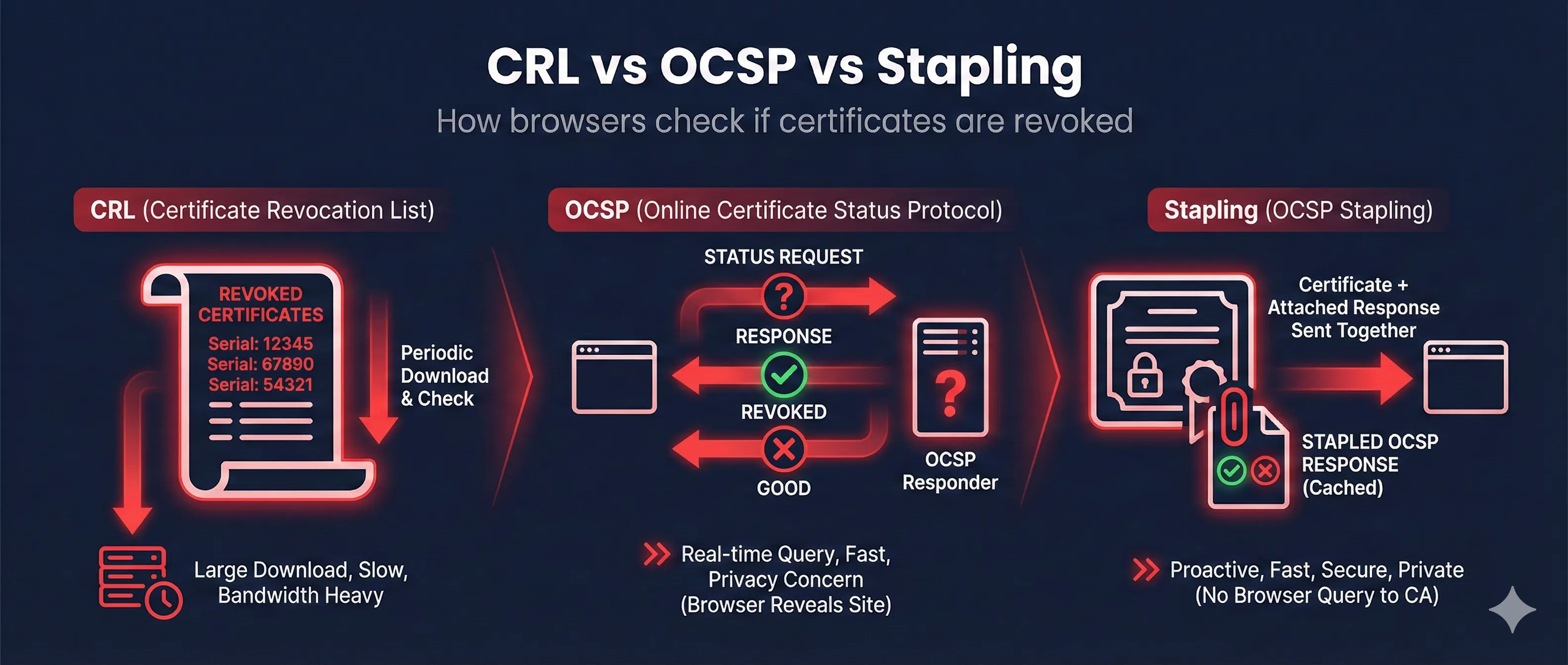
CRL - Certificate Revocation List
1
CA publishes list of ALL revoked certificates
2
Client downloads ENTIRE list (can be MBs!)
3
Client checks if cert serial is in list
4
Found = REVOKED, Not found = OK
Certificate Revocation List
Serial: 0A1B2C - Revoked
Serial: 3D4E5F - Revoked
Serial: 6G7H8I - Revoked
... (thousands more) ...
Signed by: DigiCert CA
Next Update: 24 hours
CRL Distribution Points:
http://crl.digicert.com/DigiCertTLSRSASHA2562020CA1.crl
Update: 1-24hrs
Size: MBs
Privacy: Good
Pros: Offline
Cons: Large, stale
Side-by-Side Comparison
| Feature | CRL | OCSP | OCSP Stapling |
|---|---|---|---|
| Data freshness | Hours old | Real-time | Hours old (but recent) |
| Download size | Large (MBs) | Tiny (bytes) | Tiny (bytes) |
| Privacy | ✓ Good | ✗ CA sees browsing | ✓ Good |
| Latency | First download slow | Extra round-trip | ✓ No extra latency |
| Offline support | ✓ Yes (cached) | ✗ No | ✓ Yes (stapled) |
| Server config needed | No | No | Yes |
Recommendation:OCSP Stapling gives you the best of both worlds - fresh revocation data without privacy leaks or extra latency. If you run a server, enable it.
The Soft-Fail Problem (Critical!)
HARD FAIL (Secure but breaks things)
Client: "Can't reach OCSP server"
Client: "BLOCK THE CONNECTION"
User: "Why can't I access anything?!"
SOFT FAIL (Insecure but works)
Client: "Can't reach OCSP server"
Client: "Eh, probably fine, proceed anyway"
Attacker: "Thanks for ignoring revocation!"
What browsers ACTUALLY do:
ChromeDoesn't check OCSP at allUses CRLSets instead
FirefoxSoft-fail by defaultCan enable hard-fail
SafariSoft-failProceeds if OCSP unreachable
EdgeFollows ChromeUses CRLSets
Translation: If an attacker can block OCSP traffic, most browsers will happily proceed with a revoked cert.
CRLSets (Chrome's Approach)
1. Google crawls CRLs from major CAs
2. Compiles important revocations into small "CRLSet"
3. Pushes to Chrome via auto-update
4. Chrome checks locally - no network request
Pros: Fast, private, no soft-fail
Cons: Only covers "important" revocations, not comprehensive
Cons: Only covers "important" revocations, not comprehensive
How to Check & Configure
Common Problems & Fixes
| Problem | Symptom | Cause | Fix |
|---|---|---|---|
| OCSP timeout | Slow page loads | OCSP server overloaded | Enable OCSP stapling on server |
| Revocation check failed | Browser warning | Can't reach CRL/OCSP | Check firewall, or accept soft-fail |
| Stapling not working | No OCSP response | Server misconfigured | Check resolver, ssl_stapling settings |
| Stale stapled response | Cert shows revoked | Server not refreshing | Restart server, check scheduler |
| OCSP unauthorized | Stapling fails | Wrong issuer chain | Fix ssl_trusted_certificate path |
How Revocation Evolved
CRL (old, heavy)
OCSP (real-time, privacy issues)
OCSP Stapling (recommended)
CRLSets (Chrome-specific)
Want to learn more?
Read our complete guide on certificate revocation