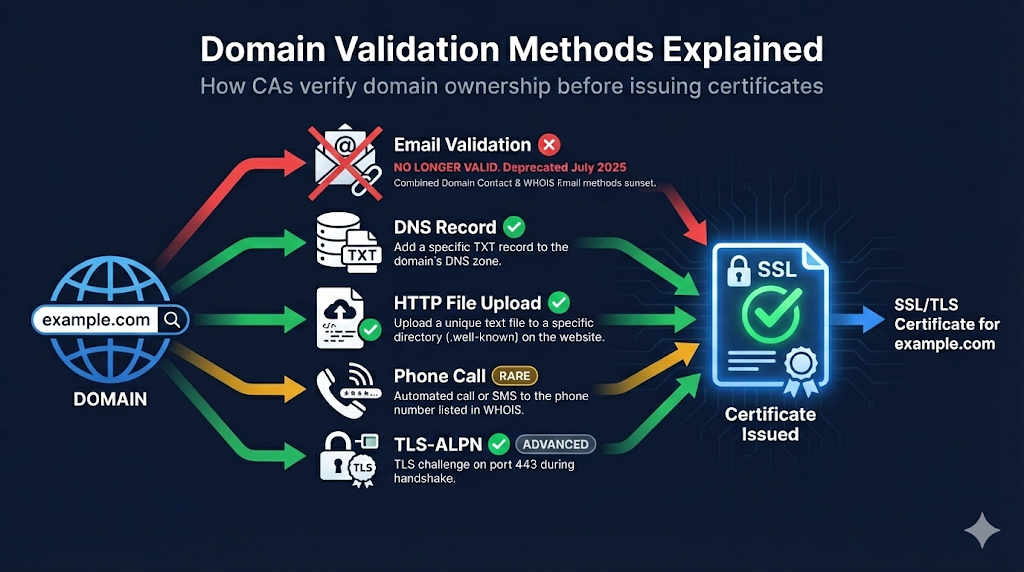
What is Domain Control Validation (DCV)?
Before a Certificate Authority issues a certificate for example.com, they must verify you actually control that domain. This prevents attackers from getting certificates for domains they don't own.
The fundamental question DCV answers:
"Does this certificate requester actually control this domain?"
Key principle: CAs verify control, not ownership. You don't need to prove you own the domain—just that you can control its DNS, email, or web server.
DCV Methods: 4 Active, 2 Deprecated
The CA/Browser Forum Baseline Requirements have defined various domain validation methods over the years. After the July 2025 email deprecation, 4 active methods remain for proving domain control.
Email to Domain Contact (BR 3.2.2.4.2)
DEPRECATEDSUNSET: July 14, 2025 - This method is no longer valid.
What it was: CA sent verification email to constructed addresses like admin@,webmaster@, hostmaster@,postmaster@, or administrator@ at the domain.
Why it was removed: Email-based validation was deemed insufficiently secure. Attackers could potentially intercept emails or compromise mailboxes more easily than DNS or HTTP challenges.
Email to WHOIS Contact (BR 3.2.2.4.15)
DEPRECATEDSUNSET: July 14, 2025 - This method is no longer valid.
Why it was removed: Same security concerns as Email to Domain Contact above, compounded by GDPR making WHOIS data unreliable anyway.
Phone Validation (BR 3.2.2.4.4)
RAREHow it works: CA calls the phone number in WHOIS or domain contact records.
Best for: OV/EV certificates requiring human verification (not typically used for DV)
Watch out: Rarely used for DV certificates. Phone number must be current in records.
HTTP File Challenge (BR 3.2.2.4.6)
ACTIVEHow it works: Place a specific file with CA-provided content on your web server.
The classic HTTP challenge:
http://example.com/.well-known/pki-validation/[random-filename].txtProcess:
- CA provides random token/filename
- You create file at specified path
- CA's server fetches the file
- Content matches = validated
Watch out: CDN caching can interfere. Load balancer configurations, WAF rules blocking CA verification requests, and file must be publicly accessible (no auth).
DNS Record Validation (BR 3.2.2.4.7)
ACTIVERECOMMENDEDHow it works: Add a specific DNS record to prove control.
DNS TXT Record Example:
_dca.example.com. TXT "random-verification-string-from-ca"Or CNAME Record:
_randomstring.example.com. CNAME ca-verification.sectigo.com.Best for:
- Wildcard certificates (often required)
- When you have DNS access but not web server access
- Automated workflows (cert-manager, ACME clients)
Technical notes: Underscore prefix (_) is intentional and required. TTL doesn't matter for validation. Record can be removed after validation.
TLS-ALPN Challenge (BR 3.2.2.4.10)
ACTIVEADVANCEDHow it works: Respond to TLS connection with specific ALPN extension value.
The ACME TLS-ALPN-01 challenge:
- CA initiates TLS connection to your server
- Your server responds with special self-signed cert containing validation token
- Uses ALPN protocol
acme-tls/1
Best for: Automated ACME validation when port 80 isn't available
Note: Port 443 must be reachable. Server must support TLS-ALPN. More complex than HTTP or DNS methods.
Comparison Table
| Method | Status | Requires | Automation | Wildcard | Difficulty |
|---|---|---|---|---|---|
| Email (constructed) | ❌ DEPRECATED | - | - | - | - |
| Email (WHOIS) | ❌ DEPRECATED | - | - | - | - |
| HTTP file | ✅ Active | Web server | ✅ Yes | ❌ No | Medium |
| DNS TXT/CNAME | ✅ Active | DNS access | ✅ Yes | ✅ Yes | Medium |
| TLS-ALPN | ✅ Active | Port 443 + config | ✅ Yes | ❌ No | Hard |
Note: Email-based DCV methods were sunset on July 14, 2025 per CA/Browser Forum ballot.
Which Method Should You Use?
For Manual Certificate Requests
DNS challenge is now the go-to for most situations. If you have web server access, HTTP challenge works too.
For Automated Renewals (ACME/Let's Encrypt)
- DNS: Better for wildcards, works even if web server isn't public
- HTTP: Simpler setup, works with most basic configurations
For Wildcard Certificates
DNS challenge is required - no other method works for wildcards.
For Internal/Private Servers
DNS challenge - doesn't require inbound connections to your server
Multi-Perspective Validation (MPIC)
New in 2024: CAs must now validate from multiple network locations to prevent BGP hijacking attacks.
What this means:
- CA checks from multiple geographic vantage points
- If results conflict, validation fails
- Protects against sophisticated routing attacks
Impact on you: Usually none—validation just works. But if you're seeing intermittent failures, check for:
- Geographic DNS inconsistencies
- CDN configurations returning different content by region
- Split-horizon DNS issues
Random Value Validity
⏰ Critical timing: The random value from your CA is only valid for 30 days.
If validation isn't completed within 30 days:
- Random value expires
- You must restart the validation process
- New random value issued
Best practice: Complete validation promptly after starting the process.
Common DCV Failures and Fixes
"Validation timed out"
Cause: CA couldn't reach your server or DNS
Fixes:
- Check firewall allows CA IP ranges (or all IPs)
- Verify DNS record is published
- Check HTTP file is accessible
dig TXT _dca.example.com"Invalid response" for HTTP validation
Cause: Wrong content, redirects, or access issues
Fixes:
- Ensure file contains EXACT string (no extra whitespace/newlines)
- Check for redirects
- Disable WAF rules temporarily
- Check CDN isn't caching old content
curl -I http://example.com/.well-known/pki-validation/xxx"DNS record not found"
Cause: Record not published, wrong zone, or propagation delay
Fixes:
- Verify record exists
- Check you're editing the right DNS zone (subdomain vs. main domain)
- Wait for propagation (check from external resolver)
dig @8.8.8.8 TXT _dca.example.comWildcard validation fails with HTTP method
Cause: HTTP validation doesn't work for wildcards
Fix: Use DNS validation instead—it's the only method that works for *.example.com
DCV for Subdomains
| Domain Type | Validates | Also Validates |
|---|---|---|
| example.com | example.com | www.example.com (usually) |
| sub.example.com | sub.example.com | Only that subdomain |
| *.example.com | All subdomains | NOT the apex (example.com itself) |
To cover both apex and wildcard: You typically need to validate bothexample.com (apex) and*.example.com (wildcard). Many CAs bundle these, but validation may be required for each.
CAA Records and DCV
CAA (Certificate Authority Authorization) DNS records can restrict which CAs can issue for your domain.
Check before validation:
dig CAA example.comIf CAA exists and doesn't include your CA, validation will fail.
Example CAA record:
example.com. CAA 0 issue "sectigo.com"
example.com. CAA 0 issue "letsencrypt.org"
Frequently Asked Questions
Related Resources
Want to see DCV in action?
Watch our Certificate Lifecycle demo to see where domain validation fits in the issuance process.
Watch Demo