Watch: DNS-01 Automation Explained
Not sure if DNS-01 automation should be your first priority? The PKI Priority Planner analyzes your environment and tells you what to focus on first.
Assess Your PrioritiesThe Promise and the Problem
DNS-01 validation unlocks capabilities HTTP-01 can't touch: wildcard certificates, internal servers, and multi-server deployments. But it comes with a catch—your ACME client needs API access to your DNS provider.
The Uncomfortable Truth
Most DNS API credentials can modify your entire zone. When you store Cloudflare or Route53 credentials on a web server, a compromise doesn't just expose certificates—it exposes your entire DNS infrastructure. An attacker could redirect all traffic, intercept email, or issue certificates for any subdomain.
ACME CAs always query your public authoritative DNS, so internal-only DNS zones by themselves are not enough—you still need a public validation path, often via a dedicated validation zone or acme-dns.
This guide covers the practical implementation of DNS-01 automation, from basic API integration to security-hardened architectures using CNAME delegation.
How DNS-01 Validation Works
When you request a certificate using DNS-01:
ACME server sends challenge
The ACME server from your CA (Let's Encrypt, Buypass, ZeroSSL, or an internal ACME endpoint) sends a challenge for each domain on your certificate request.
Create TXT record
Your client creates _acme-challenge.yourdomain.com with a computed value.
CA verifies record
Let's Encrypt (or your CA) queries DNS for the TXT record.
Certificate issued
Match confirmed, certificate delivered.
The TXT record value changes with every certificate request. This is why automation matters—manual DNS updates every 60-90 days is a recipe for outages.
Every challenge creates a fresh TXT value, so copying an old value or reusing screenshots silently breaks validation and is a common cause of "DNS problem" errors.
DNS Provider API Integration
Option 1: Native ACME Client Plugins
Most ACME clients have built-in support for popular DNS providers.
Certbot DNS Plugins
# Install Cloudflare plugin
sudo snap install certbot-dns-cloudflare

# Install Route53 plugin
sudo snap install certbot-dns-route53

# Install Azure DNS plugin
pip install certbot-dns-azure
Available official plugins: Cloudflare, Route53, Google Cloud DNS, DigitalOcean, Linode, OVH, DNSimple, DNS Made Easy, NS1, LuaDNS, Gehirn
acme.sh DNS API
acme.sh supports 150+ DNS providers natively. No plugins needed—just environment variables.
# Cloudflare example
export CF_Token="your-api-token"
export CF_Account_ID="your-account-id"
acme.sh --issue -d example.com -d *.example.com --dns dns_cf

# Route53 example
export AWS_ACCESS_KEY_ID="your-key"
export AWS_SECRET_ACCESS_KEY="your-secret"
acme.sh --issue -d example.com --dns dns_aws

# Azure DNS example
export AZUREDNS_SUBSCRIPTIONID="your-sub-id"
export AZUREDNS_TENANTID="your-tenant-id"
export AZUREDNS_APPID="your-app-id"
export AZUREDNS_CLIENTSECRET="your-secret"
acme.sh --issue -d example.com --dns dns_azure
Best practice: Wherever possible, create dedicated principals or tokens just for ACME DNS updates so you can rotate or revoke them without impacting other automation that uses the same cloud account.
Option 2: Manual with Hooks
For unsupported providers, use pre/post validation hooks:
certbot certonly \
  --manual \
  --preferred-challenges dns \
  --manual-auth-hook /path/to/auth-hook.sh \
  --manual-cleanup-hook /path/to/cleanup-hook.sh \
  -d example.com
Your auth-hook.sh receives environment variables:
CERTBOT_DOMAIN— The domain being validatedCERTBOT_VALIDATION— The TXT record value to set
The Security Problem with DNS APIs
Here's the uncomfortable truth: most DNS API credentials can modify your entire zone.
When you store Cloudflare or Route53 credentials on a web server, a compromise doesn't just expose certificates—it exposes your entire DNS infrastructure. An attacker could:
- Redirect all traffic to malicious servers
- Intercept email by modifying MX records
- Issue certificates for any subdomain
In a realistic worst case, an attacker who steals your DNS API credentials can quietly redirect login or VPN hostnames, harvest credentials, then issue their own certificates to keep the attack invisible to most users and monitors.
Least-Privilege Approaches
1Scoped API Tokens (Provider-Dependent)
Some providers allow limited-scope tokens:
- Cloudflare — Create tokens with only
Zone.DNS.Editpermission for specific zones - Azure DNS — Use RBAC to grant
DNS Zone Contributorrole only to the validation zone - Route53 — IAM policies can restrict to specific hosted zones
Example Route53 IAM policy:
{
  "Version": "2012-10-17",
  "Statement": [
    {
      "Effect": "Allow",
      "Action": [
        "route53:GetChange",
        "route53:ChangeResourceRecordSets"
      ],
      "Resource": [
        "arn:aws:route53:::hostedzone/YOUR_ZONE_ID",
        "arn:aws:route53:::change/*"
      ]
    },
    {
      "Effect": "Allow",
      "Action": "route53:ListHostedZones",
      "Resource": "*"
    }
  ]
}2Separate Validation Server
Run DNS validation from a dedicated server, then copy certificates to production:
┌─────────────────┐     ┌──────────────────┐     ┌─────────────────┐
│  Validation     │────▶│  Certificate     │────▶│  Production     │
│  Server         │     │  Storage         │     │  Servers        │
│  (DNS API creds)│     │  (S3, Vault)     │     │  (No DNS creds) │
└─────────────────┘     └──────────────────┘     └─────────────────┘
This isolates DNS credentials from production systems entirely.
3CNAME Delegation (Recommended)
The most secure approach: delegate only the validation subdomain. See the next section for full details.
CNAME Delegation: The Security Sweet Spot
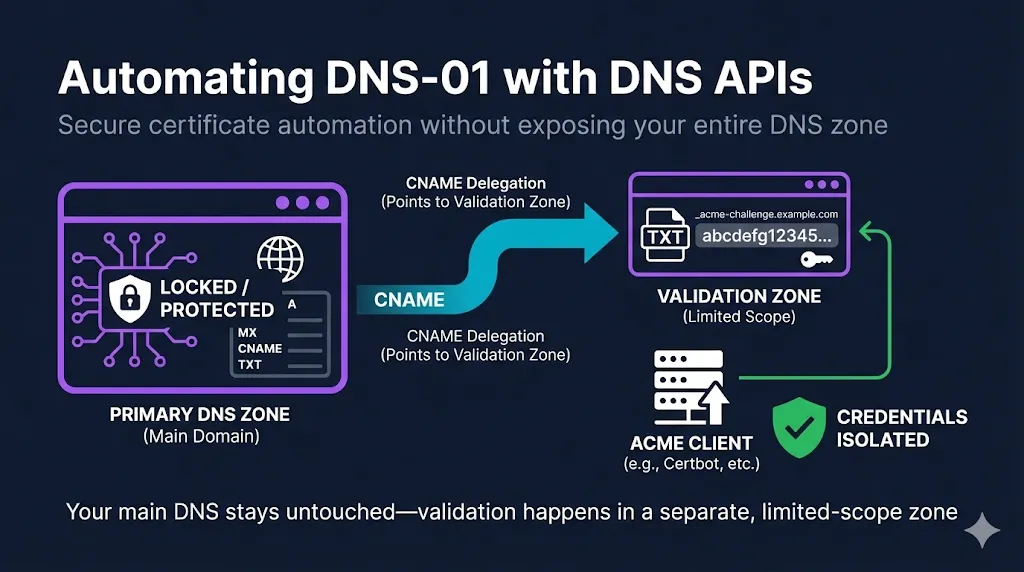
CNAME delegation lets you prove domain control without giving your ACME client access to your primary DNS zone.
How It Works
Instead of creating TXT records directly, you create a permanent CNAME that points _acme-challenge.yourdomain.com to a zone you control separately (or to a service like acme-dns).
_acme-challenge.example.com CNAME abc123.auth.acme-dns.ioWhen the CA validates:
The Key Insight
Your primary DNS zone never changes after initial CNAME setup. The ACME client only needs credentials for the delegated zone.
If you only change one thing in your current setup, make it this: move DNS-01 updates off your primary zone using CNAME delegation or a dedicated acme. zone, so day-to-day DNS and DCV automation are cleanly separated.
Option A: Self-Hosted acme-dns
acme-dns is a purpose-built DNS server that handles only ACME challenges.
Setup overview:
- Deploy acme-dns server (or use public instance at
auth.acme-dns.io) - Register to get unique subdomain and credentials
- Create CNAME in your primary zone pointing to acme-dns
- Configure ACME client to update acme-dns instead of primary DNS
# Using acme-dns with certbot
certbot certonly \
  --manual \
  --manual-auth-hook /etc/letsencrypt/acme-dns-auth.py \
  --preferred-challenges dns \
  -d example.com -d *.example.com
Security benefit: Even if acme-dns credentials leak, attackers can only create TXT records for _acme-challenge subdomains—they can't touch your A records, MX records, or anything else.
Option B: Subdelegated Zone
Create a separate hosted zone specifically for ACME challenges:
# Primary zone (example.com)
_acme-challenge.example.com     CNAME  _acme-challenge.acme.example.com
_acme-challenge.www.example.com CNAME  _acme-challenge.www.acme.example.com

# Delegated zone (acme.example.com) - separate credentials
_acme-challenge.acme.example.com      TXT  [validation token]
_acme-challenge.www.acme.example.com  TXT  [validation token]
Your ACME client gets credentials only for the acme.example.com zone.
This pattern also works when the actual application endpoints are internal-only or on private IP space: only the validation names in the delegated zone need to be publicly resolvable, while your production services stay behind firewalls and internal DNS.
Option C: Certify DNS (Managed Service)
If you don't want to run your own acme-dns:
- Certify DNS — Cloud-hosted acme-dns compatible service
- Works with any acme-dns compatible client
- No infrastructure to maintain
Functionally, this gives you the same security pattern as self-hosted acme-dns—public validation names are delegated away from the primary zone—without having to maintain the underlying DNS infrastructure.
Handling DNS Propagation
DNS changes don't happen instantly. After creating a TXT record, it may take seconds to minutes before all DNS servers see it.
The timings below are typical observed ranges, not provider SLAs; real-world propagation can be faster or slower depending on resolver caches and your TTLs.
Propagation Timing
| Provider | Typical Propagation |
|---|---|
| Cloudflare | 5-30 seconds |
| Route53 | 60-120 seconds |
| GoDaddy | 60-600 seconds |
| Traditional hosts | Up to 15 minutes |
Client Configuration
Certbot:
certbot certonly \
  --dns-cloudflare \
  --dns-cloudflare-propagation-seconds 60 \
  -d example.com
acme.sh:
# Default wait is 120 seconds
# Use --dnssleep to override
acme.sh --issue -d example.com --dns dns_cf --dnssleep 300
Verification Before Validation
Better ACME clients verify the record exists before telling the CA to validate:
# Manual check
dig TXT _acme-challenge.example.com @8.8.8.8
Some providers offer APIs to check propagation status—use them if available.
Wildcard + Apex Certificate Gotcha
When requesting both example.com and *.example.com on one certificate, both challenges point to the same TXT record location:
_acme-challenge.example.com  TXT  "token-for-apex"
_acme-challenge.example.com  TXT  "token-for-wildcard"
You need two TXT values on the same record name.
The ACME server must see both TXT values succeed at that single name before it will issue the combined apex + wildcard certificate, which is why multi-value TXT support (or a delegation workaround) is mandatory for this pattern.
Most DNS providers support multiple values, but some don't. If yours doesn't:
- Issue separate certificates for apex and wildcard
- Use a provider that supports multi-value TXT records
- Use CNAME delegation to a provider that does
Provider-Specific Configurations
 Cloudflare
Recommended: Use API Token (not Global API Key)
- Go to Profile → API Tokens → Create Token
- Use "Edit zone DNS" template
- Scope to specific zones only
# Certbot
dns_cloudflare_api_token = your-scoped-token
# acme.sh
export CF_Token="your-scoped-token"
export CF_Zone_ID="your-zone-id" # Optional but recommended AWS Route53
Recommended: Dedicated IAM user with minimal permissions
# Certbot
certbot certonly \
--dns-route53 \
--dns-route53-propagation-seconds 30 \
-d example.com
# acme.sh
export AWS_ACCESS_KEY_ID="AKIA..."
export AWS_SECRET_ACCESS_KEY="..."
acme.sh --issue -d example.com --dns dns_aws Azure DNS
# Create service principal
az ad sp create-for-rbac --name "acme-dns-automation"

# Assign DNS Zone Contributor role (scoped to zone)
az role assignment create \
  --assignee <app-id> \
  --role "DNS Zone Contributor" \
  --scope /subscriptions/<sub>/resourceGroups/<rg>/providers/Microsoft.Network/dnszones/<zone>
Google Cloud DNS
# Create service account
gcloud iam service-accounts create acme-dns \
  --display-name "ACME DNS Automation"

# Grant dns.admin role (or more restrictive custom role)
gcloud projects add-iam-policy-binding PROJECT_ID \
  --member="serviceAccount:acme-dns@PROJECT_ID.iam.gserviceaccount.com" \
  --role="roles/dns.admin"
Renewal Automation
DNS-01 certificates renew the same way they're issued. Ensure:
- Credentials remain valid — API tokens don't expire unexpectedly
- CNAME records persist — If using delegation, don't accidentally delete them
- Renewal runs regularly — Certbot's systemd timer runs twice daily by default
In multi-environment setups, run DNS-01 renewals from a controlled validation automation host that can reach both your ACME endpoint and your DNS API or delegated service, then distribute certificates to other environments.
# Test renewal
certbot renew --dry-run

# Check timer status
systemctl status certbot.timer
Monitoring Renewals
Don't wait for an outage to discover renewal failed:
- Monitor certificate expiration dates
- Alert on renewal failures
- Test with
--dry-runafter any DNS, credential, or IAM change so you catch permission or propagation regressions before the next real renewal window
Decision Matrix: Which Approach?
| Scenario | Recommended Approach |
|---|---|
| Single server, supported provider | Native DNS plugin |
| Multiple servers, same domain | CNAME delegation to acme-dns |
| High-security environment | Separate validation server + CNAME delegation |
| Unsupported DNS provider | acme-dns or manual hooks |
| Internal/air-gapped | Self-hosted acme-dns with a public-facing validation zone or forwarder |
| Minimal operational overhead | Managed service (Certify DNS) |
Common Failures and Fixes
"DNS problem: NXDOMAIN looking up TXT"
Cause: Record doesn't exist or hasn't propagated
Fix:
- Increase propagation wait time
- Verify record exists: dig TXT _acme-challenge.domain.com
- Check for typos in domain name
"DNS problem: query timed out"
Cause: DNS server unreachable or slow
Fix:
- Check DNS server health
- Try different authoritative nameservers
- Increase timeout in client configuration
"Incorrect TXT record"
Cause: Stale record from previous attempt, wrong value
Fix:
- Delete old _acme-challenge records before retry
- Verify your ACME account hasn't changed (different accounts = different tokens)
Rate limits hit
Cause: Too many failed validations or certificates issued
Fix:
- Use staging environment for testing
- Wait for rate limit window to pass
- Consolidate domains into fewer certificates
HTTP-01 works, DNS-01 fails
Cause: TXT records updated only in internal DNS, not in the public authoritative zone or delegated validation zone
Fix:
- Ensure your automation updates the same public zone the CA queries (authoritative zone or delegated _acme-challenge target), not just internal resolvers used by your apps
Security Checklist
- API credentials scoped to minimum necessary permissions
- Credentials stored securely (not in plain text, not in version control)
- CNAME delegation used where possible
- DNS credentials not stored on public-facing servers
- CAA records configured to restrict certificate issuance (applies to both HTTP-01 and DNS-01—misconfigured CAA can block otherwise correct DNS-01 flows)
- Renewal monitoring in place, including --dry-run tests after DNS or IAM changes
- Documented, tested process for credential rotation (DNS API, acme-dns, or service principals) that includes a renewal test after each rotation
Related Resources
Pair this guide with "Which DCV Method to Automate?" to decide when DNS-01 should be your default and when HTTP-01 or TLS-ALPN-01 will be simpler and easier to operate.
ACME Protocol Guide
How Let's Encrypt and ACME automate certificate issuance
ACME Protocol Demo
Interactive demo of the ACME challenge-response flow
Which DCV Method to Automate?
Decision framework for HTTP-01, DNS-01, and TLS-ALPN-01
Automating HTTP-01 on Nginx, Apache, and IIS
The simplest path to automated certificates
Automating TLS-ALPN-01
Port 443-only validation with Caddy, Traefik, and acme.sh
DCV Methods Sunset Timeline
Which validation methods are being eliminated by 2028
Let's Encrypt Best Practices
Production-ready configuration for automated certificates
acme-dns on GitHub
Purpose-built DNS server for ACME challenges