TL;DR
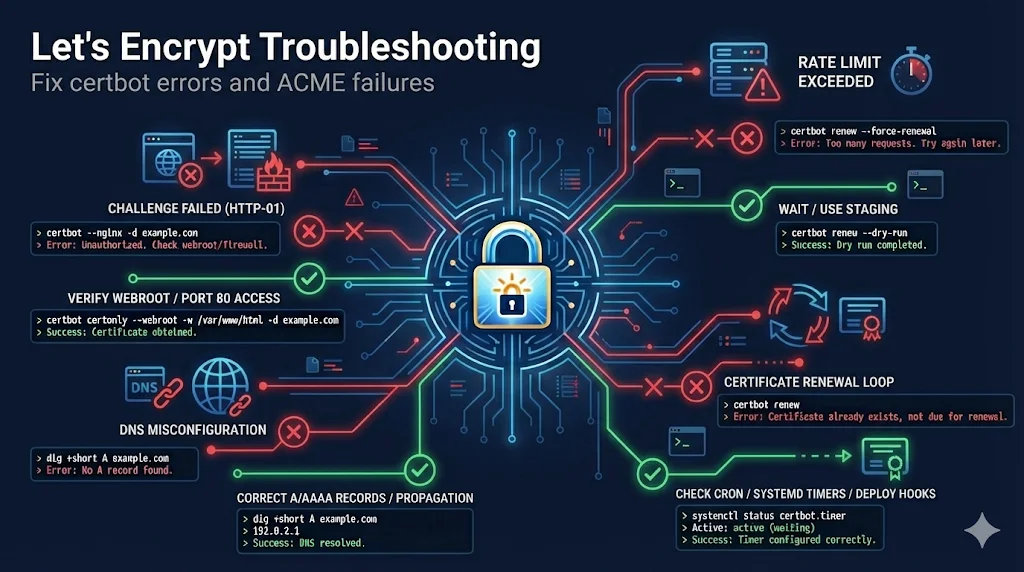
Most Let's Encrypt failures are: port 80 blocked, DNS misconfigured, or rate limited. Check these three things first before diving deeper.
Quick Error Reference
| Error | Fix |
|---|---|
| too many certificates | Wait 7 days or use different subdomain |
| Challenge failed | Check port 80, DNS, firewall |
| Connection refused | Firewall blocking port 80/443 |
| DNS problem: NXDOMAIN | Domain doesn't resolve to server |
| Timeout | Server unreachable from internet |
Rate Limits Explained
| Limit | Value | Reset |
|---|---|---|
| Certs per Domain | 50/week | Rolling 7 days |
| Duplicate Certs | 5/week | Rolling 7 days |
| Failed Validations | 5/hour | Rolling 1 hour |
Pro Tip: Use Staging
The staging environment has no rate limits. Always test there first!
certbot --staging -d example.com
HTTP-01 Challenge Failures
Let's Encrypt checks: http://yourdomain.com/.well-known/acme-challenge/TOKEN
Debug Command
curl -I http://yourdomain.com/.well-known/acme-challenge/test
Common Issues
- Connection refused: Port 80 blocked - check firewall/iptables
- 404 Not Found: Wrong document root - check web server config
- 301/302 Redirect: HTTPS redirect blocking - temporarily disable
- Timeout: Server unreachable - check DNS and routing
DNS-01 Challenge Failures
Let's Encrypt checks: _acme-challenge.yourdomain.com TXT record
Debug Commands
dig _acme-challenge.yourdomain.com TXT
dig @8.8.8.8 _acme-challenge.yourdomain.com TXT
Common Issues
- NXDOMAIN: TXT record not created - add it and wait
- Wrong value: Old token - update with new one
- Timeout: DNS propagation - wait 5-10 minutes
Renewal Problems
Diagnostic Steps
- 1
Check if timer is running:
systemctl status certbot.timer
- 2
Test with dry run:
certbot renew --dry-run
- 3
Check logs:
cat /var/log/letsencrypt/letsencrypt.log
Web Server Specific
Nginx
# Add BEFORE any redirect rules
location /.well-known/acme-challenge/ {
    root /var/www/html;
}
Apache
# In .htaccess - exclude challenges from redirect
RewriteCond %{REQUEST_URI} !^/.well-known/acme-challenge/
RewriteRule ^(.*)$ https://%{HTTP_HOST}/$1 [R=301,L]
Docker/Containers
- Certs disappear: Mount /etc/letsencrypt as volume
- Port 80 conflict: Stop host web server or use webroot mode
- DNS issues: Use host network or configure DNS
Alternative Clients
If certbot isn't working, try these alternatives:
- acme.sh: Pure shell, no dependencies
- Caddy: Built-in automatic HTTPS
- Traefik: Docker/K8s with built-in Let's Encrypt
- cert-manager: Kubernetes native